Callback API Version 1 is Deprecated Update to Latest Version in Paho-MQTT Python
If you work with Python and MQTT, you may have seen a scary error or warning. It says callback api version 1 is deprecated update to latest version. This happens when you use the popular Paho-MQTT library with newer versions. Do not worry. This change is normal, and you can fix it easily. In this guide, we will explain what it means and show you clear steps to update your code.
Many Python developers use the Paho MQTT library to connect devices in IoT projects. The library helps send and receive messages fast. But starting with version 2.0, the way callbacks work changed. Callbacks are functions that run when something happens, like connecting or getting a message. The old way, called version 1, is now deprecated. That means it still works for now, but you should upgrade callback API Paho to the new way soon.
This article is for you if you build MQTT clients for automation, messaging, or smart devices. We will keep things simple and give you real code examples.
What is MQTT and Why Use It?
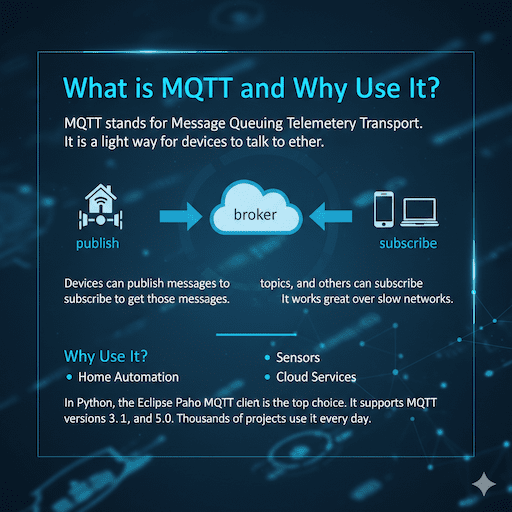
MQTT stands for Message Queuing Telemetry Transport. It is a light way for devices to talk to each other. Devices can publish messages to topics, and others can subscribe to get those messages. It works great over slow networks.
Many people choose MQTT for home automation, sensors, and cloud services. In Python, the Eclipse Paho MQTT client is the top choice. It supports MQTT versions 3.1, 3.1.1, and 5.0. Thousands of projects use it every day.
A Short History of Paho-MQTT Python
The Eclipse Paho project started years ago to give good MQTT tools. The Python client began with version 1.x. Those versions worked well for basic needs. In February 2024, version 2.0 came out with big improvements. It added better support for MQTT 5.0 features like properties and reason codes. Paho MQTT “Unsupported callback API version” error
One big change was the MQTT Python callback version. The team added a way to choose the callback style. This helps old code keep working while new code gets better features.
Today, the latest version is 2.1.0. If you install it without care, old code can break with the unsupported callback API version error.
The Problem: Why You See the Deprecation Message
When you update to Paho-MQTT 2.0 or higher, the library expects you to tell it which callback style you want. If you write code like this old way:
Python
import paho.mqtt.client as mqtt
client = mqtt.Client(“my-client-id”)
You get an error:
text
ValueError: Unsupported callback API version
Or, if you add the old style later, you see a warning:
text
DeprecationWarning: Callback API version 1 is deprecated, update to latest version
This happens because the library no longer guesses the style. The old style (version 1) is deprecated callback API version 1. It will go away in version 3.0.
The change makes things the same for MQTT 3.x and 5.0. It adds extra information to callbacks, like reason codes and properties. This helps you handle connects and errors better.
Callback API Version 1 is Deprecated Update to Latest Version
Yes, callback api version 1 is deprecated update to latest version. The team made this change to make the library stronger and ready for the future. Do not panic. You have two good choices:
- Quick fix – Use version 1 for now.
- Best long-term fix – Move to version 2.
We will show both ways next.
Quick Fix: Keep Using Callback API Version 1
If you want your code to work right now with small changes, tell the library to use VERSION1.
Here is the new way to make a client:
Python
from paho.mqtt.client import Client, CallbackAPIVersion
client = Client(CallbackAPIVersion.VERSION1, “my-client-id”)
Or shorter:
Python
import paho.mqtt.client as mqtt
client = mqtt.Client(mqtt.CallbackAPIVersion.VERSION1, “my-client-id”)
This keeps your old callback functions working. For example, your on_connect can stay like this:
Python
def on_connect(client, userdata, flags, rc):
if rc == 0:
print(“Connected!”)
else:
print(f”Connect failed with code {rc}”)
This is great for big projects where you cannot change everything at once. Many people on Stack Overflow use this fix.
You may still see a deprecation warning. That reminds you to plan an update later.
Tip: Pin your version to avoid surprises in team projects:
Bash
pip install “paho-mqtt<2.0.0.”
But we suggest updating. New versions have bug fixes and better speed.
Full Update: Move to Callback API Version 2
For the best results, update to latest version of the callback API. Use VERSION2. This gives you the same experience for all MQTT versions. You get extra details in callbacks, like properties.
Start the client like this:
Python
from paho.mqtt.client import Client, CallbackAPIVersion
client = Client(CallbackAPIVersion.VERSION2, “my-client-id”)
Now you must change your callback functions to accept new parameters. Do not worry – we will show each step by step.
Changes to on_connect Callback
Old way (VERSION1, MQTT 3.x):
Python
def on_connect(client, userdata, flags, rc):
print(f”Connect result: {rc}”)
New way (VERSION2):
Python
def on_connect(client, userdata, flags, reason_code, properties):
print(f”Connected with reason code: {reason_code}”)
print(f”Session present: {flags.session_present}”)
Key points:
- rc becomes reason_code (a ReasonCode object).
- Check success with reason_code == 0.
- Use flags.session_present (boolean) instead of a dictionary.
- You can compare reason_code to names like “Success” or “Unsupported protocol version”. paho-mqtt on PyPI
Example full code:
Python
def on_connect(client, userdata, flags, reason_code, properties1):
if reason_code == 0:
print(“Connected successfully!”)
if flags.session_present:
print(“Session is present”)
else:
print(“New session”)
else:
print(f”Connect failed: {reason_code}”)
Changes to on_disconnect Callback
New signature adds flags, reason_code, and properties.
Python
def on_disconnect(client, userdata, flags, reason_code, properties):
if reason_code == 0:
print(“Clean disconnect”)
else:
print(f”Unexpected disconnect: {reason_code}”)
Changes to on_message Callback
Good news – this one stays the same!
Python
def on_message(client, userdata, message):
print(f”Topic: {message.topic}”)
print(f”Payload: {message.payload.decode()}”)
Changes to on_subscribe Callback
Old: granted_qos list of numbers.
New: reason_codes list of ReasonCode objects.
Python
def on_subscribe(client, userdata, mid, reason_codes, properties):
for rc in reason_codes:
if rc.value < 128:
print(f”Subscribed with QoS {rc.value}”)
else:
print(f”Subscribe failed: {rc}”)
Changes to on_unsubscribe Callback
Now reason_codes is always a list.
Python
def on_unsubscribe(client, userdata, mid, reason_codes, properties):
for rc in reason_codes:
if rc.value >= 128:
print(f”Unsubscribe failed: {rc}”)
Changes to on_publish Callback
Adds reason_code and properties (often None for MQTT 23).
Python
def on_publish(client, userdata, mid, reason_code, properties):
print(f”Published message {mid} with {reason_code}”)
Complete Example: Publisher and Subscriber with Version 2
Here is a full subscriber using the new API:
Python
from paho.mqtt.client import Client, CallbackAPIVersion
import time
def on_connect(client, userdata, flags, reason_code, properties):
if reason_code == 0:
print(“Connected!”)
client.subscribe(“test/topic”)
else:
print(f”Failed: {reason_code}”)
def on_message(client, userdata, message):
print(f”Received: {message.payload.decode()} on {message.topic}”)
client = Client(CallbackAPIVersion.VERSION2, “subscriber-123”)
client.on_connect = on_connect
client.on_message = on_message
client.connect(“broker.emqx.io”, 1883)
client.loop_forever()
Publisher example:
Python
from paho.mqtt.client import Client, CallbackAPIVersion
def on_connect(client, userdata, flags, reason_code, properties):
if reason_code == 0:
client.publish(“test/topic”, “Hello from updated Paho!”)
client = Client(CallbackAPIVersion.VERSION2, “publisher-123”)
client.on_connect = on_connect
client.connect(“broker.emqx.io”, 1883)
client.loop_start()
These examples work with free public brokers for testing.
Benefits of Updating to Version 2
- Same behavior for MQTT 3.x and 5.0.
- Better error details with reason codes.
- Ready for future Paho versions.
- Cleaner code with object properties.
- Full use of MQTT 5 features, like user properties.
Many developers say the update makes their MQTT IoT applications more strong.

Common Errors and How to Fix Them
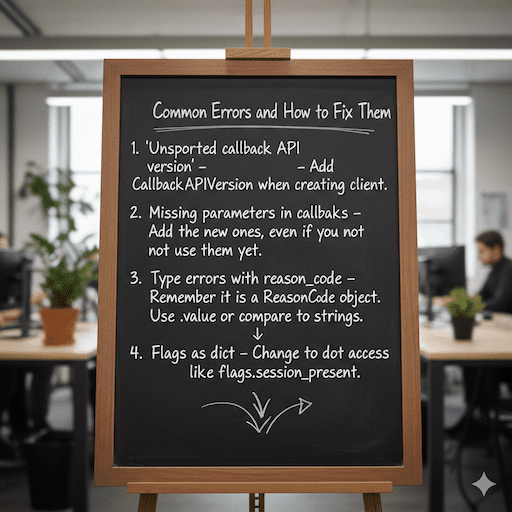
- “Unsupported callback API version” – Add CallbackAPIVersion when creating client.
- Missing parameters in callbacks – Add the new ones, even if you do not use them yet.
- Type errors with reason_code – Remember it is a ReasonCode object. Use .value or compare to strings.
- Flags as dict – Change to dot access like flags.session_present.
Troubleshooting callback API version 1 deprecation warning: Use VERSION2 to remove the warning forever. Migration to Paho MQTT Python v2
Best Practices for Paho-MQTT Projects
- Always set CallbackAPIVersion explicitly.
- Use VERSION2 for new projects.
- Add try/except around connect.
- Log reason codes for debugging.
- Test with both clean and old sessions.
- Keep dependencies updated but test after upgrades.
FAQs
Do I have to update right now?
No, you do not have to update today. Your old code still works perfectly on MQTT version 2.x brokers. You only need to change it later when version 3.0 comes out. So keep using it now and plan to update before 3.0.
Will my old code break on public brokers?
No, almost all public brokers like HiveMQ, EMQX, and Mosquitto still support the old way. The change is only in your Python code, not on the broker side. Your old code will keep working for a long time on public servers.
Is there an async version?
Yes! You can use aiomqtt or MQTTX async libraries. They work with async/await and are built on top of Paho. They have the same small changes for the new version, but they are very easy to use.
Where can I see all reason code names?
Look in the official Paho Python docs here:https://eclipse.dev/paho/index.php?page=clients/python/docs/index.php 3. You will find a full list of all reason code names and what they mean. It is the best place to check every code.
Conclusion
You now know why callback api version 1 is deprecated update to latest version. The change helps make Paho-MQTT better for everyone. Start with VERSION1 for a quick fix. Then move to VERSION2 for the best results. Your MQTT projects will run smoother and be ready for the future.
Follow the examples here, and your code will work great. Paho MQTT v2 callback style is worth the small effort.
References
- Eclipse Paho Python migration guide: Migration to Paho MQTT Python v2 – Full details on all changes, including callback signatures. ↩︎
- Stack Overflow discussion on the unsupported callback error: Paho MQTT “Unsupported callback API version” error – Great real-world examples and quick fixes. ↩︎
- Official Paho-MQTT package on PyPI: paho-mqtt on PyPI – Current version info and release notes. ↩︎