HubSpot Hidden Features: Easy Tools You Can Use Today to Save Time and Grow
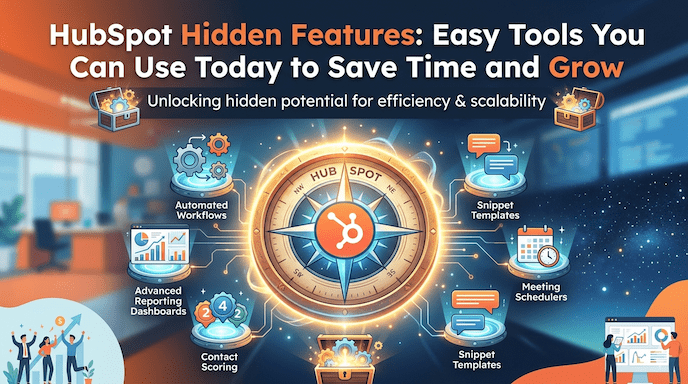
Many people use HubSpot every day, but only touch the easy parts. They send basic emails, track contacts, and check simple reports. Yet the platform holds many HubSpot hidden features that can change how you work. These tools sit quietly inside your account and wait for you to discover them.
If you run a small or growing business, manage the CRM, or lead a team, these HubSpot advanced tools and underrated features give you real help. You save hours each week. Your messages feel more personal. Your data stays clean. Your sales team closes deals faster. Leaders see clear proof that their investment in HubSpot pays off well.
This guide explains the best HubSpot hidden features in plain language. You will learn practical HubSpot tips and tricks for HubSpot CRM, hidden features, marketing automation features, sales tools, and productivity hacks. Everything comes from real ways people use the platform successfully. You can start small and see quick wins without buying anything extra.
Why Many People Miss These Helpful Tools
Most teams miss these tools because daily work keeps them busy. They stick to what they already know. Sometimes they think the advanced options look too complicated. When you begin exploring HubSpot hidden features, you quickly notice the difference. Your CRM feels organised. Marketing reaches the right people at the right time. Sales move more smoothly. Everyone works with more confidence.
For small businesses, this means getting more value from the money you already spend. Experienced users discover faster ways to finish tasks. Admins set things up once and enjoy smoother days. Decision makers see real numbers that prove the platform helps the whole company grow.
Keep Your CRM Clean and Useful
Your CRM holds all your customer information. Clean data makes every other part better. Duplicate detection works quietly as one of the most useful HubSpot CRM hidden features. It spots contacts or companies that look almost the same by checking emails or website addresses. You can merge them with just a few clicks. This stops salespeople from calling the same person twice by mistake. Your reports become accurate, and your team trusts the numbers more.
Another helpful part is missing data insights. This tool points out records that miss important details such as job titles or company size. You see the gaps clearly and can fix them fast or set up a simple workflow to collect the information. When your data improves, you group contacts better and send messages that actually match what each person needs. Lead scoring also works much more accurately with fuller records.
Breeze Intelligence adds fresh details automatically using AI. It watches website activity and tells you which companies show real buying interest. The tool pulls in company size, industry, and other facts without you doing extra research. Growing businesses like this because it uncovers hidden opportunities and keeps information up to date for workflows and reports.
You can also create custom behavioural events to track special actions that matter to your business. For example, someone who watches most of your videos or downloads several guides. These events help you understand true interest and trigger the right next step automatically.
Make Marketing Easier with Personal Touches
Marketing becomes less tiring when you use the right marketing automation features. Smart content lets one email or page change parts of itself for different visitors. You build it once, and HubSpot shows the right offer based on where someone sits in their journey or what device they use. People respond better because the message feels made just for them. This turns email personalization tools into something truly powerful without extra work.
Remix stands out as a real time-saver in the Content Hub. You feed it a strong blog post, and the AI turns it into social updates, email ideas, short videos, or even podcast scripts. It suggests which channels might work best and helps you track results. Marketing teams create more content with far less effort. This counts as one of the best HubSpot features that save time for marketing teams.
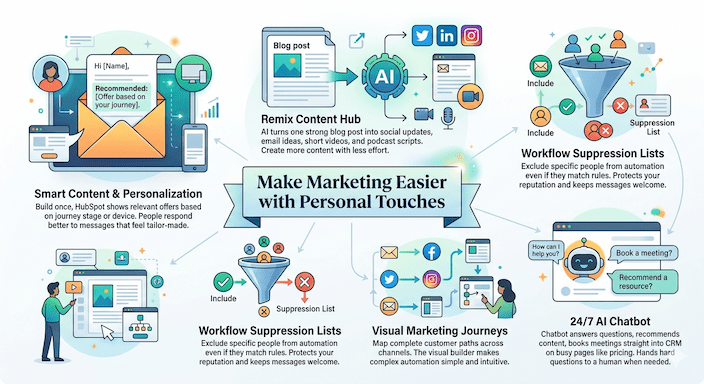
You gain better control with a workflow suppression list. Even if many contacts match your rules, you can keep certain people out or remove them later. This protects your reputation and keeps messages welcome. Marketing journeys let you draw full customer paths across email, social, and other channels. The visual builder makes complex automation feel simple and personal.
An AI chatbot stays ready on your website around the clock. It answers questions, recommends helpful content, and books meetings straight into the CRM. Place it on busy pages like pricing and watch it qualify leads while you sleep. It hands hard questions to a real person when needed.
Simple Sales Tools That Save Time Every Day
Salespeople repeat many small tasks that eat up their day. Snippets fix this nicely as a simple HubSpot productivity hack. You save short pieces of text once and then drop them into emails, notes, or chats with one click. Common replies, welcome messages, or follow-ups stay consistent. Salespeople spend more time having real conversations and less time typing the same things over and over.
Sequences handle polite follow-ups automatically at the right times while still sounding human. HubSpot payments lets you send quotes and collect money without leaving the CRM. No more switching apps or chasing invoices. Deals close faster and more smoothly, especially for smaller or quicker sales.
When you focus on important companies, target accounts bring all their activity into one clear view. Everyone on the team sees what the buying group does together. Deal pipeline waterfall shows how your pipeline changes week by week, so you spot problems early and coach your team well. Requirements to progress make sure key steps happen before a deal moves forward. This keeps the process clean and professional.
Lead Scoring and Nurturing That Helps You Focus
Lead scoring and nurturing help you talk to the right people when they feel ready. You give points for actions like visiting pricing pages or opening certain emails. High scores flag hot leads so sales know exactly where to focus. Nurturing workflows then send useful content step by step. A new contact might get welcome tips while a warmer lead receives case studies. Personal touches make people feel cared for and raise your chances of winning business.
Review your scoring rules every few months. As your business changes, the rules should change too. This keeps everything fresh and effective as part of good CRM optimisation techniques.
Clear Reports That Show the Real Story
Good reporting turns all this activity into clear insights. Custom reports and custom dashboards pull information from marketing, sales, and service together. You see which campaigns truly influence revenue and where deals slow down. Attribution reporting shows the full customer story instead of giving all credit to the last click. You learn what really works and can spend your time and money more smartly. Goals let you set clear targets and watch progress with automatic alerts.
Use reporting and analytics in HubSpot every week. Look at the numbers. Celebrate wins. Fix weak spots. Your whole team improves.
Workflow Automation That Removes Repeat Work
HubSpot workflow automation removes the boring, repetitive work once you set it up. You start simple with thank-you emails after form fills. Then add delays and branches so the timing feels natural. When someone opens a message, you can send more details. If not, try a different approach. Admins can set default values for properties and use business-day delays so nothing sends on weekends. Test everything on small groups first to keep things safe.
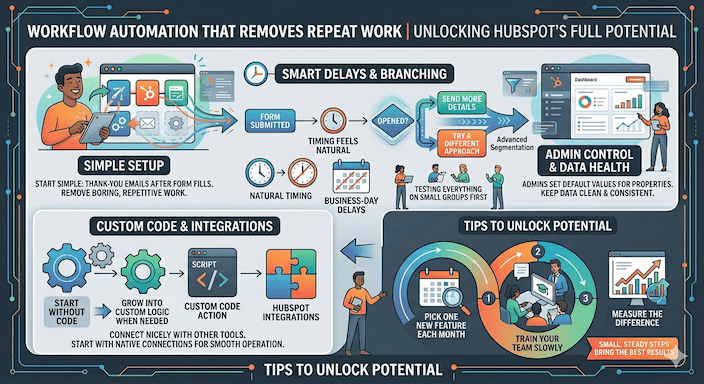
Custom code actions in workflows let you add special logic when you need it. Most teams begin without code and grow into it later. HubSpot integrations connect nicely with other tools you already like. Start with native connections because they work smoothly.
Tips to unlock HubSpot’s full potential include picking one new feature each month. Train your team slowly. Measure the difference each time. Small, steady steps bring the best results.
Why These Tools Work Well for Small and Growing Businesses
Small and growing businesses get strong value from HubSpot features for SMBs. Many helpful options work well even on lower plans when you use them wisely. The mobile app keeps everyone productive away from their desk. You update contacts, log calls, and see notifications from anywhere. Remote teams stay quick and responsive.
HubSpot CRM features for small businesses focus on keeping data clean and automating just enough to scale nicely. Start with what hurts most right now. Fix that pain point and then move to the next one. You grow without feeling overwhelmed.
How These Hidden Features Help Boost Sales
Here is a natural way to bring these HubSpot hidden features together and boost sales. First, clean your CRM with duplicate detection and missing data insights. Next, set up basic lead scoring so hot prospects rise to the top. Use snippets and sequences for fast, consistent follow-ups. Add smart content for messages that feel personal. Turn on payments to finish deals without extra steps. Check Breeze Intelligence for fresh buyer signals and review attribution to focus on winning channels.
When you combine these steps, you create a helpful loop. Better data leads to smarter targeting. Faster follow-ups create quicker closes. Clearer reports show what to improve next. Many small companies have seen real growth this way. One team replied to warm leads within hours instead of days and closed more deals. Another group repurposed content and doubled engagement on social media with almost no extra time.
Easy Ways to Start Using These Tools
Take it one step at a time to avoid feeling lost. Look through your HubSpot portal and note what you already use. Pick one HubSpot hidden feature that solves your biggest headache today. Turn it on, test it with a small group, and measure the change. Teach your team how it works. Celebrate the win and then add another feature next month.
For marketing automation best practices, always test messages before sending them widely and keep your lists clean. For sales pipeline management, check the waterfall view each week and talk openly about any leaks in team meetings.
Admins make daily life easier by grouping properties neatly, setting smart default values, and creating clear rules for lifecycle stages. Check active workflows regularly and turn off old ones that no longer help. Update scoring models as your ideal customer changes over time.
FAQs
What are HubSpot hidden features?
HubSpot’s hidden features are tools inside HubSpot that many users do not notice. They help you save time, improve sales, and keep your data clean.
Who can use these hidden features?
Small businesses, sales and marketing teams, admins, and leaders can use them. They work for anyone who wants HubSpot to do more.
How do hidden features save time?
They automate tasks like follow-ups, data cleanup, and email personalisation. This lets your team focus on real work, not repeats.
What is duplicate detection?
Duplicate detection finds contacts or companies that appear more than once. You can merge them fast so your data is correct.
How does lead scoring help?
Lead scoring gives points to contacts based on their actions. It shows which leads are ready for sales so your team can focus there.
Conclusion
HubSpot hidden features prove that you often do not need new software. You just need to use what you already have in smarter ways. These HubSpot advanced tools, underrated features, workflow automation, lead scoring and nurturing, email personalization tools, and strong reporting and analytics in HubSpot help experienced users, SMBs, admins, and leaders alike. You save time, engage customers better, and grow with more confidence.
Start with whichever feature feels easiest for your team this week. You will quickly notice less stress and better results. Your platform becomes a true growth engine instead of just another tool.