Difference Between SSD and HDD for Gaming PC
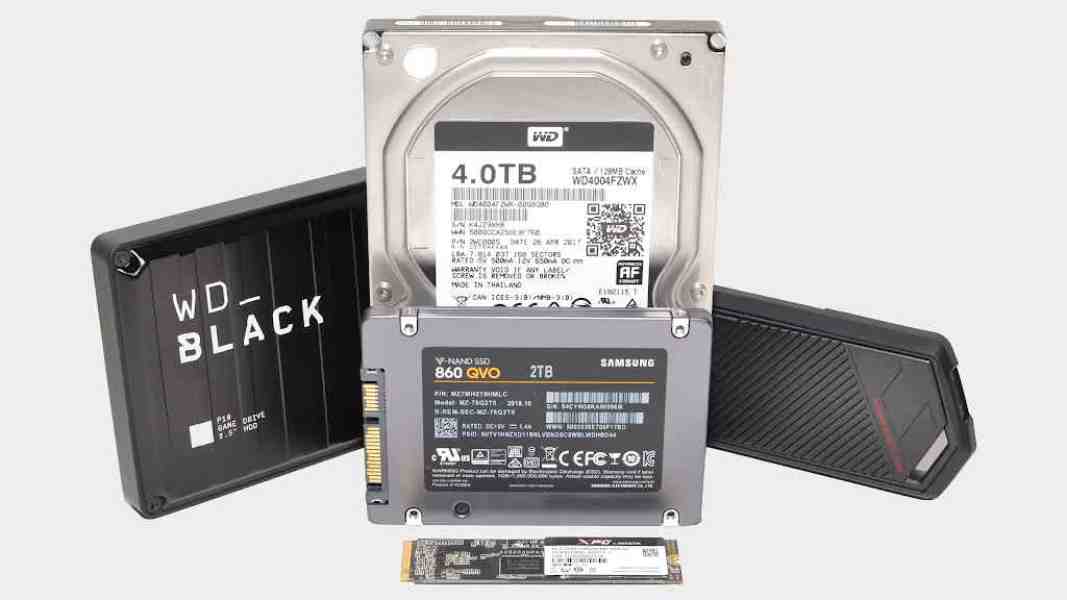
If you are a PC gamer, you know how frustrating long load screens can be. The difference between SSD and HDD for gaming PC comes down to speed and how smooth your games feel. Solid State Drives (SSDs) load games much faster than Hard Disk Drives (HDDs). This means less waiting and more playing.
In this guide, we will break down the difference between SSD and HDD for gaming PC in simple terms. We will look at real examples from games like Cyberpunk 2077 and Marvel Rivals. You will see why most gamers now choose SSDs for their main games.
What Is an HDD?
A Hard Disk Drive (HDD) is the old way to store data. It uses spinning disks called platters. A small arm moves over the disks to read or write data. This is like an old record player.
HDDs are good because they hold a lot of data at a low cost. You can get big ones like 4TB or more without spending much. But the moving parts make them slow. They can also break if you bump your PC.
For gaming, HDDs work, but you wait longer for games to start or levels to load.
What Is an SSD?
A Solid State Drive (SSD) uses flash memory chips to store data. There are no moving parts. Data is saved like in a big USB stick, but much faster.
SSDs come in two main types for gaming PCs:
- SATA SSD: Connects like an old HDD but is way faster.
- NVMe SSD: Uses a special slot on your motherboard for even more speed.
SSDs cost more per GB than HDDs, but prices have dropped a lot. They are quiet, use less power, and do not break easily.
Key Differences: SSD vs HDD
Here are the main ways SSDs and HDDs are different:
- Speed: SSDs read and write data much faster. SSDs can hit thousands of MB/s. HDDs top out around 150-200 MB/s.
- Load Times: Games start in seconds on SSD. On HDD, it can take a minute or more.
- Durability: SSDs have no moving parts, so they handle shocks better.
- Noise and Heat: HDDs spin and make noise. SSDs are silent and stay cooler.
- Power Use: SSDs use less battery in laptops.
- Cost: HDDs are cheaper for big storage.
For gaming, the big win is game loading times and less stuttering in big worlds.
How Storage Affects Gaming Performance
Many gamers ask: Does SSD improve gaming performance? Yes, but not in every way.
- FPS (Frames Per Second): Storage does not change your FPS much once the game is running. Your GPU and CPU do that job. Tests show almost no FPS difference between SSD and HDD.
- Load Times: This is huge. SSDs cut wait times a lot.
- Stuttering: In open-world games, HDDs can cause pauses when loading new areas. SSDs keep things smooth.
- Texture Streaming: Modern games pull textures fast. SSDs help avoid blurry pops.
Real tests from 2025 show big gaps.
Real Game Load Time Examples
Here are numbers from recent tests:
- Cyberpunk 2077:
- SSD: 6 seconds to load a save.
- HDD: 63 seconds – over 10 times slower!
- Marvel Rivals (multiplayer):
- SSD boot: 10 seconds.
- HDD boot: 49 seconds.
- Load: SSD 8 seconds vs HDD 67 seconds.
- Warhammer: Vermintide 2:
- Smaller gap, but SSD is still faster by about 50%.
In multiplayer, slow loads on HDD mean you miss the start or annoy teammates.
For open world games like GTA V or Red Dead Redemption 2, SSDs reduce stutters when driving fast into new areas.
Game stuttering issues often go away with an SSD upgrade.
The difference between SSD and HDD for gaming PC
Does SSD Reduce Load Times?
Yes! Here is a simple table of average differences:
| Game Example | SSD Load Time | HDD Load Time | How Much Faster? |
| Cyberpunk 2077 | 6-10 seconds | 60+ seconds | Up to 10x |
| Marvel Rivals | 8-10 seconds | 60-70 seconds | 7-8x |
| Typical AAA Title | 15-30 seconds | 60-90 seconds | 3-5x |
| Boot Windows | 10-20 seconds | 1-3 minutes | Much faster |
These come from benchmarks by sites like PCWorld and TechSpot.
Does SSD Affect FPS?
No big change. Tests show HDD vs SSD gaming FPS difference is almost zero. You might see 1-2 FPS more on SSD in rare cases, but not worth it for FPS alone.
The feel is better on SSD because of no pauses.
SSD Benefits for Gaming
- Faster boot times for your PC and games.
- Quick installs and updates.
- Better in open-world game loading.
- Fewer game stuttering issues.
- Overall, the gaming PC responsiveness.
Many gamers say switching to SSD feels like a new PC.
SATA SSD vs NVMe SSD vs HDD
Not all SSDs are the same.
- HDD: Slowest, best for cheap big storage.
- SATA SSD: Big upgrade from HDD. Loads games 3-5 times faster. Good for the budget.
- NVMe SSD: Fastest. Uses a PCIe slot. Even quicker than SATA, but the difference is small in most games (1-5 seconds less load).
For modern AAA games, NVMe is nice. But even SATA SSD beats HDD by a lot.
Is NVMe SSD worth it for gaming? Yes, if your motherboard supports it. Prices are close now.
Best Storage for Gaming PC
Most gamers do a mix:
- SSD for OS and main games: Fast loads every day.
- HDD for old games, movies, photos: Cheap space.
This is called a gaming PC storage setup SSD + HDD.
If budget allows, go all SSD. Games are huge now – many over 100GB!
Should I install games on SSD or HDD? Put your favorite games on an SSD. Move others to HDD.
For modern AAA games, an SSD is almost needed. Some games warn if on HDD.
SSD vs HDD for online gaming: No FPS help, but faster joins and less wait.
Budget Tips for Gamers
You do not need the most expensive drive.
- Start with a 1TB SSD for OS and 5-10 games.
- Add a 4TB HDD for more.
- Good budget SSDs: Many options under $100 for 1TB.
Best SSD for gaming PC budget build: Look for a reliable SATA or NVMe.
SSD upgrade for gaming: Easy win. Many see the biggest improvement here over the new GPU sometimes.
Why SSD Is Better Than HDD for Gaming PC
The difference between SSD and HDD for gaming PC is clear: SSDs make gaming fun again by cutting waits.
HDDs are okay for storage, but slow for active games.
Real players on forums say: “SSD for games/OS, HDD for storage.” This is common advice.
Gaming storage optimization: SSD for what you play now.
Does SSD improve gaming performance? Yes – smoother, faster experience.
Is SSD better than HDD for gaming PC? Yes, for sure.
FAQs
SSD or HDD for a gaming PC?
Use an SSD for your main drive and all your games. It makes everything load super fast. Use an HDD only for extra storage, like old files or movies.
SSD vs HDD gaming load time comparison?
SSDs are 3 to 10 times faster than HDDs. Games load in seconds with SSD, not minutes. Real tests show this big difference.
SSD vs HDD for open-world games?
SSD is much better for big open-world games. You get way less lag and stutter when running around. The world feels smooth and fun.
Gaming PC SSD vs HDD real performance?
Real tests show SSD is the clear winner. Loading screens are short, and gameplay feels better. Almost every gamer picks SSD now.
Should I install games on SSD or HDD?
Yes, always put games on an SSD. It gives the best speed and fun experience. Save the HDD for things you don’t play often.
Conclusion
The difference between SSD and HDD for gaming PC is all about speed and fun. SSDs give faster boot times, quicker game loading times, and better gaming PC responsiveness. They cut PC gaming load screens and help with texture streaming in games.
While HDDs are cheap for big storage, SSDs are a must for modern gaming. Pair them for the best setup: SSD for daily games, HDD for rest.
Upgrading to SSD is easy and makes a big difference. Many gamers call it the best upgrade.
References
Here are your references rewritten with clean, clickable anchor text (using Markdown format):
- The Truth About PC Gaming on SSDs vs. HDDs, Tested – PCWorld (February 2025) Real benchmarks showing up to 10x faster loads on SSD.
- HDD Vs SSD for Gaming: How to Choose the Right Storage – Intel Explains technical differences and gaming advantages like reduced stutters.
- Reddit r/buildapc thread: “SSD or HDD for gaming?” Community advice on practical setups and real user experiences.