Fixing the Flutter Unsupported Operation Cannot Add to an Unmodifiable List Error

If you work with Flutter, you may see this error: Flutter unsupported operation cannot add to an unmodifiable list. It stops your app and feels confusing at first. This error happens when you try to add something to a list that Dart does not allow to be changed. Do not worry – it is common and easy to fix. In this guide, we explain why it happens and show you clear ways to solve it.
What Does the Flutter Unsupported Operation: Cannot Add to an Unmodifiable List Error Mean?
Dart, the language behind Flutter, has two kinds of lists: ones you can change (mutable) and ones you cannot (immutable).
A mutable list lets you add, remove, or change items anytime. An immutable list stays the same forever. When you try to change an immutable list, Dart throws the unsupported operation Flutter Dart error.
This keeps your app safe and predictable, especially in big projects. flutter: Unsupported operation: Cannot add to an unmodifiable list – Stack Overflow1
Difference Between Mutable and Immutable Lists in Dart
Here is a simple breakdown:
- Mutable list: You create it with [] or List() → You can add items freely.
- Immutable list: You create it with const [] or special views like UnmodifiableListView dart → You cannot change it.
Many developers see the Dart unmodifiable list error when they use const by habit. Const lists save memory, but you cannot modify them later.
Why Does the Cannot Add to Unmodifiable List Flutter Error Happen?
This error shows up in these common spots:
- You use a const list Dart Flutter in your code.
- You get a list from state management tools like Bloc or Provider.
- You call .toList() without extra options.
- You work with data from APIs or maps.

Example of the Error
Look at this code:
Dart
class MyState { final List<String> items = const []; // This is immutable! } void addItem(MyState state, String newItem) { state.items.add(newItem); // Boom! flutter list add unsupported operation }
Dart says no because the list is const.
In Flutter apps with Flutter Bloc list update or provider immutable state, states stay immutable on purpose. Direct changes cause the flutter state management error.
How to Fix the Flutter Unsupported Operation Cannot Add to an Unmodifiable List Error
You have many easy fixes. Pick the one that fits your code.
Fix 1: Make a Modifiable Copy with List.from() or toList()
The best way is to copy the list first.
Dart
void addItem(List<String> originalList, String newItem) { List<String> mutableList = List.from(originalList); // Safe copy // Or: List<String> mutableList = originalList.toList(growable: true); mutableList.add(newItem); // Works fine now // Use the new list in your state or UI }
List.from() Dart creates a new list that you can change. Use this often in Flutter copy list before modifying.
Fix 2: Use the Dart Spread Operator
The spread operator … is quick and clean.
Dart
void addItem(List<String> originalList, String newItem) { List<String> newList = […originalList, newItem]; // New list with extra item // Pass newList to your state }
This fits perfectly with Dart spread operator list. It keeps old data safe and adds new items.
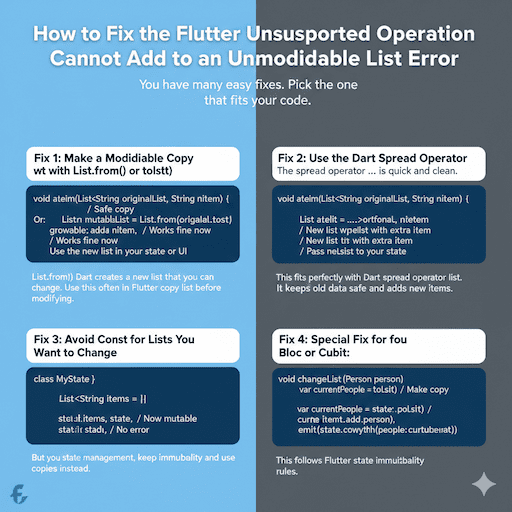
Fix 3: Avoid Const for Lists You Want to Change
If you control the list, remove const.
Dart
class MyState { List<String> items = []; // Now mutable } void addItem(MyState state, String newItem) { state.items.add(newItem); // No error }
But in state management, keep immutability and use copies instead.
Fix 4: Special Fix for Bloc or Cubit
In Flutter bloc, unsupported operation cannot add to list. Do this:
Dart
void changeList(Person person) { var currentPeople = state.people.toList(); // Make copy currentPeople.add(person); emit(state.copyWith(people: currentPeople)); }
This follows Flutter state immutability rules.
For Flutter provider list modification error, notify listeners with a new list copy. flutter: Unsupported operation: Cannot add to an unmodifiable list – DBestech Tutorial2
Common Scenarios and Real Fixes
Scenario 1: Lists in Widgets
You pass a list to a StatelessWidget and try to add items.
Bad code:
Dart
class MyWidget extends StatelessWidget { final List<String> items; MyWidget(this.items); @override Widget build(BuildContext context) { items.add(“new”); // Error! flutter immutable list error return Container(); } }
Fix: Make a copy or use a StatefulWidget.
Scenario 2: Working with API Data
APIs often give unmodifiable views.
Fix:
Dart
List<dynamic> apiData = response.data; // Might be unmodifiable List<dynamic> workingData = List.from(apiData); workingData.add(extraItem);
Scenario 3: Const Lists in Models
You see, Flutter const list cannot add elements to data classes. Error in HistoryRepository: ‘Unsupported operation: Cannot add to an unmodifiable list’ – GitHub Issue #1053
Fix: Use copyWith and spread.
Dart
MyModel copyWithNewItem(String item) { return MyModel(items: […this.items, item]); }
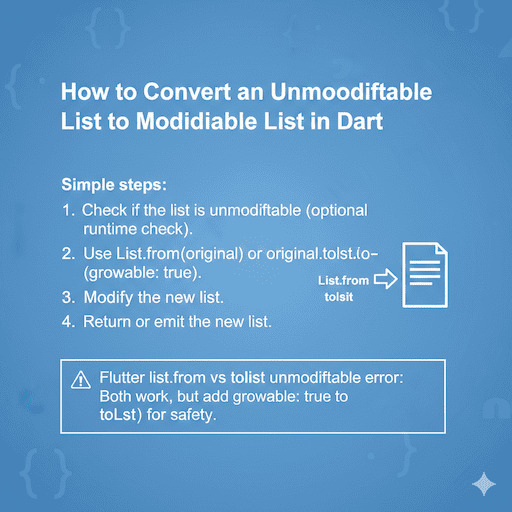
How to Convert an Unmodifiable List to a Modifiable List in Dart
Simple steps:
- Check if the list is unmodifiable (optional runtime check).
- Use List. from(original) or original.toList(growable: true).
- Modify the new list.
- Return or emit the new list.
Flutter list.from vs tolist unmodifiable error: Both work, but add growable: true to toList() for safety.
Best Practices to Avoid the Flutter List Mutation Error
- Always copy lists before changing them in immutable setups.
- Prefer the spread operator for small changes.
- Use packages like freezed for automatic copyWith.
- Test list modifications early.
- Keep state immutable in Provider, Bloc, or Riverpod.
Following these stops, the Flutter runtime error unmodifiable list before it starts.
FAQs
Why Flutter Throws Unsupported Operation Cannot Add to List?
Flutter says “no” because the list is locked. It is like a box that you cannot open or add things to. The list was made with “const” or in a way that says “do not change me.” So adding things makes an error.
How to Make a List Mutable in Dart Flutter?
To make a list you can change, do not use “const.” Make a new list that is a copy of the old one. Use “List. from(oldList)” or “[…oldList]” to get a list you can add to.
Flutter Unsupported Operation Cannot Add to an Unmodifiable List Fix?
The best way is to make a new list: newList = […oldList, newItem]. This makes a fresh list that you can change. Now you can add things without getting an error.
How to Fix Cannot Add to Unmodifiable List in Flutter?
First, make a copy of the list that you can change. Use “[…oldList]” or “List.from(oldList)”. Then add your new thing to this copy. This keeps the old list safe.
Difference Between List.from() and toList()?
Both make a new copy of the list. List.from() always makes a list you can change. toList() can make a list you can change or a locked one, if you say growable: false.
Conclusion
The flutter unsupported operation cannot add to an unmodifiable list error teaches you about Dart’s safe design. You now know causes like const lists and immutable state. Fixes include copies, spread operators, and good patterns. UnmodifiableListView class – Dart API Documentation4
References
- flutter: Unsupported operation: Cannot add to an unmodifiable list – Stack Overflow Great answers and examples from the discussion. ↩︎
- flutter: Unsupported operation: Cannot add to an unmodifiable list – DBestech Tutorial Clear steps for fixing in Bloc/state management. ↩︎
- Error in HistoryRepository: ‘Unsupported operation: Cannot add to an unmodifiable list’ – GitHub Issue #105 Real-world example from an app issue. ↩︎
- UnmodifiableListView class – Dart API Documentation Official Dart docs on unmodifiable lists. ↩︎