Google Snake Game Easter Eggs 2026: Hidden Modes, Mods, and Hacks

Remember the days of pressing tiny rubber keys on a Nokia 3310, guiding a pixelated snake toward blinking dots while trying not to hit the wall? That same addictive loop — deceptively simple, brutally punishing — has made an unlikely comeback, not on a brick phone, but inside the world’s most-used search engine.
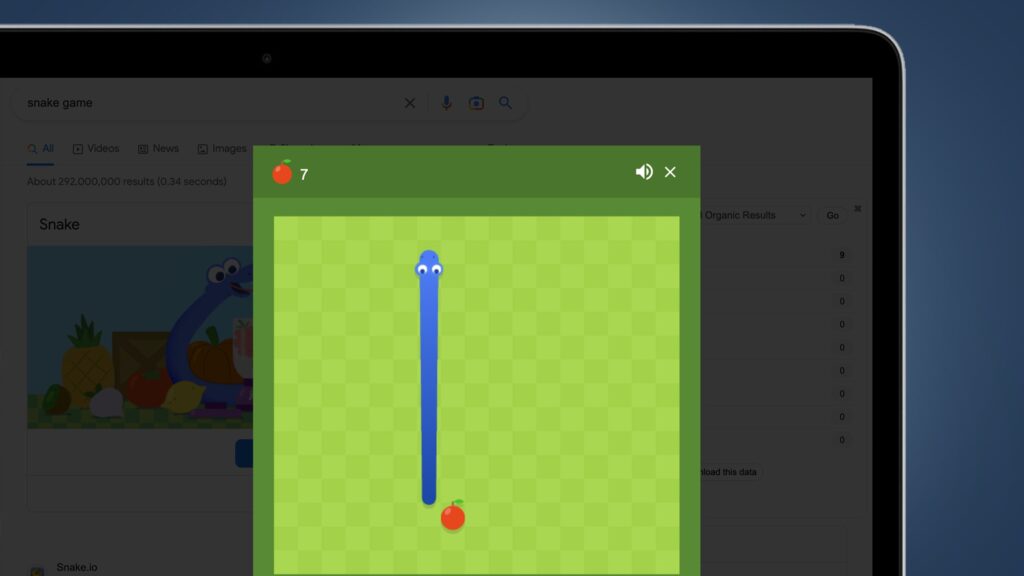
Google Snake has quietly evolved from a nostalgic nod into one of the most-played browser mini-games on the planet, racking up over 45 million plays and a near-perfect 4.8-star rating from more than 15,000 votes. No download. No account. Just type “Snake Game” in Google and you’re in.
But the game you see on the surface is only half the story. Beneath the familiar grid lies a surprisingly deep ecosystem — hidden modes that completely rewire the rules, unlock systems that reward the obsessive, community-built mods that push the engine to its limits, and even a forgotten Google Maps Easter egg that turned city streets into a playground.
This guide breaks all of it down. Whether you’ve been playing since the Nokia era or you just discovered the game exists, here’s everything you need to know about Google Snake in 2026 — including what’s new, what’s hidden, and what actually gives you the best score.
How to Toggle Hidden Game Modes
Getting In (Zero Friction)
One of Google Snake’s biggest advantages is its accessibility. There’s no installation, no account creation, no loading screen to sit through. Open any desktop browser or your phone’s Google app, search “Snake Game,” and the game launches directly inside the search results. This zero-friction model is a core reason browser mini-games consistently outperform downloadable alternatives in casual engagement — the moment a player decides to play is the moment they’re already playing.
The game works across both desktop and mobile, though the experience differs in meaningful ways we’ll cover later.
The First Choice: Wall vs. Classic
Before the grid even appears, you’re asked to make a decision that shapes your entire session: Wall Mode or Classic Mode.
Wall Mode gives you a bounded arena. Hit the edge and it’s over. This is the high-difficulty version — it punishes lazy turning and forces spatial planning several moves ahead.
Classic Mode removes that boundary. Your snake loops through walls and exits from the opposite side, creating an infinite playing field that’s more forgiving but introduces its own trap: the longer your snake, the more likely you are to collide with yourself mid-warp.
Neither is objectively better. Wall Mode dominates competitive and speedrun communities. Classic Mode is where most casual players stay longest.
The Big 5 Modes — Plus the 2026 Addition
Hidden inside the mode selector are six distinct gameplay variations that completely change how the game feels:
Portal Mode punches holes in the arena edges. Your snake enters one portal and exits another at a random location — or a mirrored one, depending on the layout. It rewards spatial awareness and punishes tunnel vision.
Wall Mode (as a selectable variant) adds destructible or static obstacles mid-grid. Navigation becomes a chess game. One wrong turn in a tight corridor ends everything.
Cheese Mode breaks the most fundamental rule: your snake can pass through itself. At first this sounds like an easy mode, but it completely rewires your movement instincts and the scoring ceiling collapses without the self-collision pressure.
Twin Mode is the cruelest option for solo players — you control two snakes simultaneously. They move in tandem, which means a safe path for one is often a death sentence for the other. Coordination difficulty spikes immediately.
Winged Mode removes the grid constraint entirely. Your snake floats. Movement is no longer strictly tile-based, opening up diagonal approaches and freeform navigation that feels closer to an arcade shooter than a classic Snake variant.
Yin-Yang Mode (2026 Addition) is the newest entry. The screen splits into mirrored halves and each half responds to your controls in opposite directions simultaneously. It’s a deliberate nod to the Year of the Snake theme and is noticeably harder than every other mode at high lengths — your brain has to process two movement paths at once, both competing for the same input.
30-Second How to Play
- Desktop: Use arrow keys. Input is registered instantly, with the lowest possible latency.
- Mobile: Swipe in the direction you want to turn. Note that swipe inputs carry a measurable delay — usually 80–120ms longer than desktop key presses — which matters enormously at higher speed tiers.
For your first session, stick to Classic Mode with the default speed setting. Once you can consistently clear the grid, start experimenting with modes.
The 5 Most Popular Hidden Modes
The competitive Google Snake community tracks over 21 documented gameplay variations, and the five modes above dominate leaderboards, speedrun attempts, and community challenges. Here’s why each one has developed its own following:
Portal Mode has become the go-to for players who want to test spatial intelligence rather than reflex speed. The moment-to-moment decision of “where will I exit?” transforms navigation into anticipation. High-score attempts in Portal Mode require mentally mapping portal pairs while simultaneously tracking snake length — a multi-layer challenge that casual modes don’t offer.
Wall Mode is the competitive standard. Its bounded arena means scores are directly comparable, and its unforgiving boundary turns any mistake into an immediate end. Speedrunners favor it because optimal routes can be planned, memorized, and executed.
Cheese Mode attracts players who want to explore movement mechanics divorced from the survival pressure. It’s popular for modded runs and challenge categories precisely because it’s so mechanically different from anything else on the grid.
Twin Mode has developed a dedicated niche as the hardest default mode for experienced players. Its coordination demands go beyond what any single-snake mode can produce, and community records in Twin Mode are among the rarest achievements tracked on speedrunning platforms.
Winged Mode appeals to players who find grid-locked movement restrictive. The freeform navigation creates emergent strategies that other modes can’t replicate, and its high-score runs look visually unlike anything else in the game.
Step-by-Step: How to Unlock Secret Skins & Fruits
The Trophy System
Google Snake uses a milestone-based unlock system that ties cosmetic rewards to performance. The two headline unlocks are:
Gold Skin — awarded when you hit a specific cumulative fruit milestone. The threshold isn’t publicly documented by Google, but community consensus places it somewhere between 50 and 100 fruits collected across sessions, depending on the fruit type. Once unlocked, the Gold Skin persists across sessions in the same browser profile.
Rainbow Skin — the hardest cosmetic to obtain. It requires either a specific sequence of fruit types consumed in order, or reaching an advanced progression threshold in multiple modes. Exact requirements vary by browser and remain partially undocumented — part of what keeps the community active and sharing new findings.
The underlying mechanic here is clever: cosmetic unlocks increase replay value without changing the core game balance. Players who have no interest in skins still benefit from the system because it keeps the broader community engaged, which in turn sustains the leaderboard and content ecosystem around the game.
Fruit Mechanics Explained
The type of fruit that appears on the grid isn’t just aesthetic — each one modifies gameplay in real time:
Onion leaves a temporary trail in the path where it was consumed. This trail blocks movement just like your snake’s body, adding a ghost obstacle that shrinks available space for several seconds after collection. In a tight grid with a long snake, an ill-timed Onion pickup can create a dead end that didn’t exist moments before.
Pineapple increases your speed tier immediately upon collection. This is the highest-risk, highest-reward fruit in the game. More speed means more score per second, but it also compresses your reaction window. At the maximum speed tier, the gap between a survivable turn and a wall collision is a single frame.
Other fruits (apple, cherry, berry variants) affect score pacing and movement rhythm in subtler ways — some increase snake length faster, others slower, which changes the pressure curve of any given run.
Seasonal Themes in 2026
The Year of the Snake Lunar New Year update brought the most significant visual overhaul Google Snake has received in years. Active through the early weeks of 2026, the update introduced:
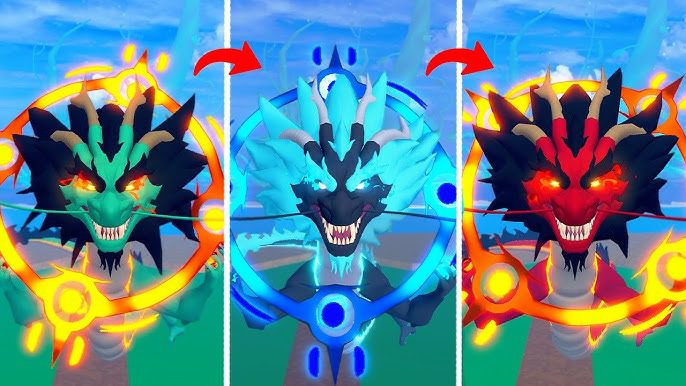
- Dragon-style animated skins that replace the default snake design
- Festive gold and red color palettes applied across the grid and UI
- Seasonal fruit variants with themed iconography
Seasonal content tied to Lunar New Year has historically been one of Google’s highest-engagement periods for the game, with play volume spiking significantly during the themed window. If you missed the active period, the standard skins remain — but screenshots and recordings of the seasonal variants have become something of a collector’s item in the community.
Adding your own screenshots of unlocked skins when sharing strategies is worth doing — it signals real experience to other players and builds credibility in community spaces where many discussions devolve into speculation.
The “Menu Mod” Deep-Dive: Customizing Your Snake
What Are Snake Mods?
Google Snake mods are JavaScript-based enhancements that run on top of the default game without modifying Google’s servers. They inject additional functionality into the browser session — extending what’s possible far beyond the default feature set.
The community built around these tools is substantial: over 42,850 recorded runs, 5,600+ active players, and thousands of followers across platforms who track both vanilla high scores and modded category records. The distinction matters — serious players separate unmodded runs from modded ones the same way any speedrunning community separates categories.
Popular Tools
Two tools dominate the modding scene:
MoreMenu is a bookmarklet — a small piece of JavaScript saved as a browser bookmark. Click it while Google Snake is open and a new overlay menu appears with toggle options that don’t exist in the default interface.
DarkSnakeGang is a collection of open-source repositories on GitHub that contains more advanced modifications, including custom color editors, grid overlays, and extended UI panels.
Installation Guide (Safety First)
Installing the MoreMenu bookmarklet takes under two minutes:
- Open your browser’s bookmark manager
- Create a new bookmark — the name can be anything (“Snake Mod” works)
- In the URL/address field, paste the bookmarklet JavaScript code (sourced only from the official MoreMenu GitHub repository)
- Save the bookmark
- Navigate to Google Snake in your browser
- Click the bookmarklet from your bookmarks bar — the mod menu will appear
Critical safety note: Only use bookmarklet code from the official DarkSnakeGang GitHub page or well-documented community sources. Never paste code from forum comments, Discord links, or third-party sites you can’t verify. Malicious bookmarklets can execute arbitrary JavaScript in your browser session — the same session where you may be logged into Google. Treat this exactly as you would treat any browser extension installation.
Customization Features
Once the menu is active, you gain access to features the default game deliberately omits:
Hex color customization — change your snake’s color to any six-character hex value. Useful for accessibility (high contrast) and purely aesthetic preference.
Invisible snake / neon grid — toggle visibility modes that change the visual presentation without affecting hitbox behavior. The neon grid variant is popular in recording and streaming contexts.
Expanded UI controls — additional toggles for elements like score display formatting and grid line visibility.
Advanced Features
The deeper menu layers include:
Input counters — display a real-time count of directional inputs. Useful for analyzing movement efficiency after a run.
Speed multipliers — adjust the base game speed beyond the three default tiers (slow/normal/fast). Community records in custom speed categories are maintained separately from standard runs.
Extra toggles — including experimental mode combinations that the default selector doesn’t allow, such as mixing Portal and Wall obstacles in the same session.
Lost Easter Eggs: The Google Maps Integration (Legacy)
The 2019 April Fools Event
In 2019, Google launched one of its most ambitious Snake Easter eggs: a fully playable Snake game embedded directly into Google Maps. It was framed as an April Fools’ Day feature, but the execution was genuinely impressive.
Players could navigate a snake through real-world city layouts, collecting passengers and cargo across six cities:
- London — navigating iconic street grids near the Thames
- Cairo — winding through routes around major landmarks
- San Francisco — grid-based navigation through the Bay Area street network
The snake in this version represented a tram or bus, collecting passengers at stops — a thematic overlay that made the city maps feel purposeful rather than arbitrary.
How to Play It Today
The Google Maps Snake game is no longer available through standard Google Maps navigation. However, it remains accessible through a few routes:
elgooG-style mirrors — archived versions of Google products hosted by third parties preserve some seasonal features. Search specifically for “Google Maps Snake 2019” to find preserved playable versions.
Android hidden triggers — some users have reported accessing Maps Snake through specific version combinations of the Google Maps Android app, though this is highly version-dependent and not reliably reproducible.
Why It Matters
The Maps Snake integration isn’t just a fun footnote — it’s a case study in how Google tests the boundaries of Easter egg design. A temporary April Fools experiment that generates enough engagement can become a template for future features. The permanent Google Snake game that exists today benefited from learnings gathered across years of temporary experiments exactly like the Maps version.
Pro-Tips: Mastering Physics & Hitboxes
Hitbox Visibility
The hitbox — the actual collision boundary of your snake — doesn’t perfectly align with every skin equally. Two skins consistently outperform others for hitbox clarity:
Black skin provides the highest contrast against the default white grid, making edge cases (turns within one tile of the wall) visually unambiguous.
Neon skin (available via MoreMenu) offers strong contrast against a dark grid overlay and is preferred by players who record their runs, since the visual clarity holds up better in compressed video formats.
Physics Differences by Mode
Each mode doesn’t just change the rules — it changes the physics of optimal movement:
In Portal Mode, the angle at which you enter a portal matters. Entering from the left side of a portal tile gives you a different exit position than entering from the right side. Advanced players map portal entry points before committing to a path that uses them.
In Wall Mode, turning radius is the critical variable. Tight corridors between obstacles require turns initiated one tile earlier than your instincts suggest. Players who come from Classic Mode consistently under-turn in their first Wall Mode sessions.
Speed & Scoring Mechanics
Speed and score are directly linked. Higher speed tiers generate score multipliers — meaning a player at fast speed doesn’t just finish a run faster, they accumulate more points per fruit collected.
The adjustable variables in the default game are:
- Speed: Slow / Normal / Fast
- Grid size: Small / Standard / Large
Small grid at fast speed is the highest-difficulty combination and generates the highest possible score per minute — but the margin for error is essentially zero at advanced snake lengths.
Platform Comparison
Desktop is the clear winner for competitive play. Arrow key inputs register at the browser’s native polling rate — typically 60Hz or higher — and the absence of touch input removes the swipe delay variable entirely. Frame-perfect gameplay, where the difference between survival and collision is a single animation frame, is only reliably achievable on desktop.
Mobile introduces a 80–120ms input delay from swipe detection. For casual play, this is imperceptible. For high-score attempts at fast speed, it’s the difference between a survivable turn and a wall.
Troubleshooting & 2026 Accessibility
Common Bugs
Freezing gameplay is the most disruptive issue and typically appears after extended sessions — 20+ minutes of continuous play in a single tab. The cause is browser memory accumulation: the game’s JavaScript allocates memory as the session progresses and doesn’t always release it efficiently.
Performance drops — frame stutters or reduced animation smoothness — most commonly trace back to conflicting browser extensions. Ad blockers and script managers can interfere with the game’s rendering loop. Disabling extensions selectively helps identify the culprit.
Accessibility & Availability
One of Google Snake’s genuine strengths is universal access: no download, no account, playable instantly across mobile and desktop browsers in virtually every country where Google Search is available. The 2026 version continues this model without changes to the core access structure.
Offline play is possible through two routes: Google’s own Doodle archive (accessible at doodles.google.com) includes preserved versions of past Doodle games including early Snake iterations, and browser-based caching can preserve the game for short offline sessions if the page was loaded while connected.
A word on mod safety: Only download JavaScript mods and bookmarklet code from trusted GitHub sources. The DarkSnakeGang repository is the community standard. Everything else should be treated as unverified until you can confirm the source.
Power User Sidebar: Feature Toggle Reference
| Icon | Mode Name | Effect |
| 🏆 Trophy | Mastery | Tracks fruit milestones; unlocks Gold Skin |
| 🍎 Fruit Counter | Score Tracker | Displays cumulative collection count |
| ⚡ Speed Toggle | Pace Control | Cycles through slow / normal / fast |
| 🌀 Portal | Portal Mode | Teleports snake through edge portals |
| 🧀 Cheese | Pass-Through | Snake can cross its own body |
| 👥 Twin | Dual Control | Two snakes, one input set |
| 🪶 Winged | Free Movement | Removes grid tile constraint |
| ☯️ Yin-Yang | Mirror Split (2026) | Mirrored dual-screen control |
Visual toggle systems like this dramatically reduce the time new players spend discovering features. The gear and trophy icons in the default interface serve this function — surfacing options that would otherwise stay buried.
FAQs
How do I start playing Google Snake?
Simply search “Snake Game” on Google using any desktop or mobile browser. The game launches instantly—no download or account needed.
What’s the difference between Wall and Classic Mode?
Wall Mode ends the game if you hit the edge, while Classic Mode lets your snake pass through walls, creating an infinite field.
How do I unlock skins like Gold or Rainbow?
Collect fruit milestones or follow specific fruit sequences. Gold Skin is easier, Rainbow Skin requires advanced achievements across modes.
Are there hidden modes I can try?
Yes! Portal, Cheese, Twin, Winged, and the 2026 Yin-Yang Mode each offer unique challenges beyond Classic and Wall.
Can I play with mods safely?
Only use official community sources like MoreMenu or DarkSnakeGang on GitHub. Avoid unverified code to protect your browser.
Conclusion
Google Snake in 2026 is no longer just a search engine Easter egg — it’s a game with a genuine competitive scene. Thousands of tracked runs on speedrunning platforms, active Reddit and Discord communities exchanging mode strategies and mod setups, and seasonal updates from Google itself have created a persistent player base that shows no signs of shrinking.
The Yin-Yang Mode addition this year signals that Google is still actively iterating on the game rather than treating it as a finished product. The shift from static Easter eggs to ongoing seasonal updates is a meaningful one — it turns casual discoverers into returning players and gives the community new records to chase.
If you haven’t experimented beyond Classic Mode, start with Portal Mode. It’s the most accessible difficulty jump and the most immediately interesting change to how the game feels. Once you’re comfortable with portal navigation, Twin Mode will reframe everything you thought you understood about the controls.
And if you want the best high score your setup can produce: fast speed, small grid, Wall Mode, Black skin for hitbox clarity, desktop browser, arrow keys only.
Which fruit and mode combination gives you your best high score? Drop it in the comments — the answer changes more than most players expect.