Canva Secret Codes: Unlock Hidden Elements and Pro Graphics for Perfect Designs
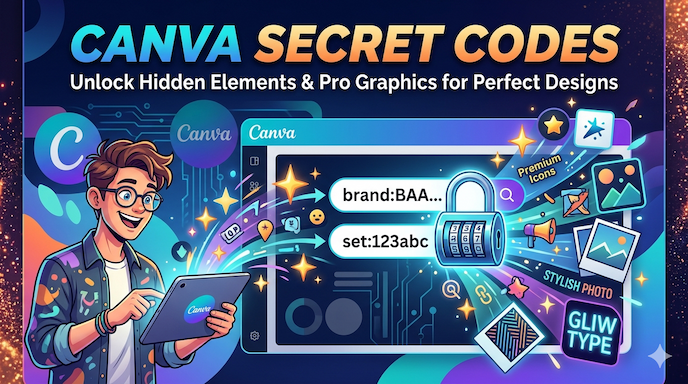
Do you use Canva and feel tired of looking through many pictures to find the right one? Canva secret codes help you get to special graphics and Canva Pro elements very fast. These codes make your work look nice and save you time.
Canva secret codes are easy words you type in the search box. They show you whole groups of pictures from one maker. Many people, like content creators, bloggers, small business owners, and design lovers, use them. They get eye-catching pictures without paying a designer. Canva Pro users get even more good things from these codes.
This guide teaches you how to use Canva secret codes. You will also learn about Canva hidden codes and Canva aesthetic element search codes. These Canva design shortcuts and Canva design hacks help you make the same look for your brand. You can use them for Canva secret codes for Instagram templates, blog pictures, or social media posts. The steps are simple and clear.
Canva hidden features like these make Canva fun and strong to use. Let us start now.
What Are Canva Secret Codes
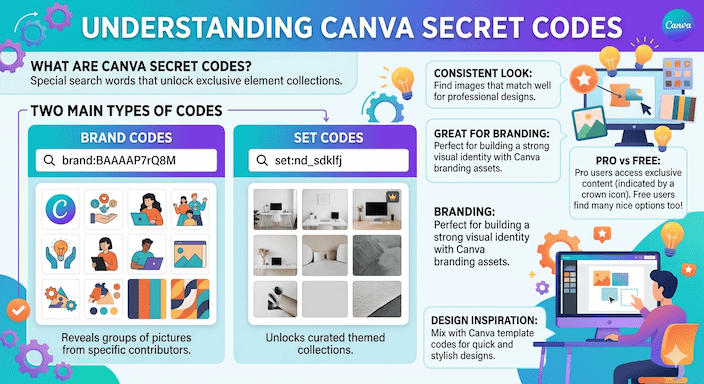
Canva secret codes are special search words that open groups of pictures in Canva. There are two main kinds. One kind starts with a brand and then a code like brand: BAAAAP7rQ8M. The other starts with a set and then a code.
These codes come from the people who make pictures for Canva. When you type them, you see many pictures that look the same. This helps you make designs that match well. It is good for Canva branding assets.
Canva Pro elements are often easy to find with these codes. People who pay for Canva Pro see more special pictures. Even people who use the free Canva can find many nice free pictures.
Many people mix these codes with Canva template codes to make quick and pretty work. This gives good Canva design inspiration.
Why Canva Secret Codes Are a Game Changer for Your Workflow
Many people who know a little about Canva still spend a lot of time looking for pictures. Canva productivity tips with secret codes make this much faster. One code shows you many good pictures at once.
Small business owners can make their brand look the same everywhere. They use one code to get pictures, icons, and colors that match. This saves money because they do not need to pay a designer.
Bloggers and people who make content need pretty pictures fast for posts and social media. Canva secret codes for Instagram templates and blog designs help them finish work quickly.
People who love design use these codes to find pretty styles like boho or simple looks.
Canva Pro users get the most help. They can remove backgrounds and use more tools. When you add Canva hidden codes, you get even better results.
Canva is used by many people in big countries like the United States, the United Kingdom, Canada, Australia, Germany, and India. Many say they save a lot of time with these tricks.
These Canva design hacks also help you think of new ideas. You find new styles you did not see before. This brings fresh Canva design inspiration.
How to Find and Use Canva Secret Codes Step by Step
It is easy to learn how to use Canva’s secret codes.
First, open Canva and make a new design or open one you have. On the left side, click the word Elements. Look at the search box on top. Type the code exactly as it is. Then press enter. You will see all the pictures from that code.
Next, use the buttons on top to pick only free pictures or only Pro pictures. You can also pick colors or moving pictures. Then pull the picture you like onto your page.
Here is a good tip. Put a picture you like on your page. Click the three dots next to it. Choose View more by brand. The code will show up. You can also click the small i button to see more.
You can type the at sign and a name like @sketchify to find things fast.
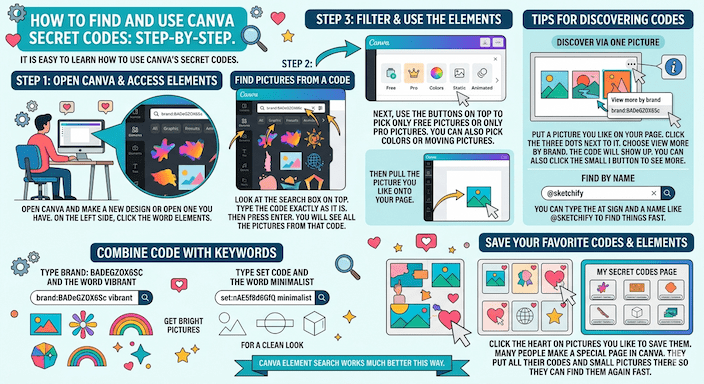
Mix the code with other words. For example, type brand: BADeGZOX6Sc and the word vibrant. You get bright pictures. Or type set code and the word minimalist for a clean look.
Canva element search works much better this way. Click the heart on pictures you like to save them. Many people make a special page in Canva. They put all their codes and small pictures there so they can find them again fast.
Popular Canva Brand Codes for Different Styles
Here are some good Canva brand codes you can try. They come from places many people use and trust.
For only free pictures, try Pixabay, which is a brand: BADPSfoNnvM for nice photos. Statement Goods is a brand: BADxbsl67kc. Sparrow and Snow is a brand: BADxmfFVmVk for flower and nature looks. Bea and Bloom is a brand: BADqYTsQvvg. Anugraha Design is a brand: BADxD-1hjSY.
For Pro pictures that look very nice, try Marsala Digital brand: BAD2BbIfm6k for drawings. Glebakh is a brand: BADHhofuVm0. DAPA Images is a brand: BADOKQ7rDcQ. Vector Tradition is a brand: BACBM0xenGo. The Angela Collection is a brand: BAD695DwEDM for shapes and nature.
These Canva brand codes help you get Canva visual elements that all look good together. This is very useful for Canva branding assets when you run a small business.
Make one page in Canva called My Canva secret codes. Put the codes and small example pictures there. It helps you work faster next time.
Canva Set Codes and Hidden Element Collections
Set codes open special groups of pictures with one theme.
Some set codes people like are set:nAFZYkE9ydk, set:nAFYkmwvoiU, set:nAEkqdcWKXw, and set:nAFRn8gIefM. One more is set:nAFRU7FZhzw for fun 3D pictures or calm wellness pictures.
Type the full set code in the search box. You will see the group of pictures. These show Canva hidden features like ready-made packs that look special.
Add more words to the set code. For example, type the set code and then boho flowers. Or type the set code and gradient purple. This gives you Canva aesthetic codes results very fast.
Canva Aesthetic Element Search Codes and Keyword Strategies
Canva aesthetic element search codes work best when you add words that tell the feeling you want.
For nature looks, try words like organic illustrations, organic blob, boho wildflowers, dried flowers, watercolor leaves, or eucalyptus.
For a simple and clean look, use minimalist patterns, geometric shapes, a simple background, or a neutral background.
For old time looks try a vintage frame, retro flower, polaroid frame, or cottagecore.
For boho and warm earth looks, use boho aesthetic, boho brushstroke, terracotta, or rustic watercolor.
For modern art looks, try abstract shapes, a gradient blob, or a terrazzo pattern.
For magic and sky looks use moon phases, zodiac symbols, ethereal, or tarot cards.
For care and people looks try self-care illustrations, affirmations, or a strong woman.
For paint looks, use brushstroke, paint stroke, or washi tape.
For boxes and lines, use an organic frame, curved arrow, or quote box.
Type these words alone or with your brand or set codes. Good mixes are boho aesthetic dried flowers or minimalist retro geometric. For Canva hidden codes for premium elements, add the word pro or choose the Pro filter.
Canva Design Hacks Using Secret Codes for Specific Projects
For Instagram and social media, Canva’s secret codes for Instagram templates help you make posts that all look the same. Find a brand code for icons, then add an Instagram frame. This makes nice carousels and story pictures fast with Canva shortcut codes to save time.
For blog pictures, Canva secret codes for blog post designs help with big header pictures and infographics. Mix paper texture with a brand code for a nice scrapbook feel. Or mix a divider with a pretty word for clean breaks in your post.
For your business look how to find Canva secret codes for branding is very useful. Pick one or two codes you like. Use them to make logos, social pictures, colors, and patterns. Canva brand codes make sure all your things feel like they come from one place.
Advanced Tips and Canva Productivity Tips
You can put a brand code, a set code, and one more word together. This gives you pictures that are just right for you.
Always check if you want free or Pro pictures. Star the ones you like so you can find them again fast.
After you put one picture on the page, Canva often shows you more like it. This is a nice help.
Make one master page with all your code and small pictures. Add new ones when you find them.
Add words like summer or holiday to your code when the season changes.
Use these codes with other Canva creative tools, like the magic help in Pro. This makes your work even better.
These Canva tips and tricks and Canva design hacks help you work faster and have more fun. People who know some Canva see big changes when they start using code. They move from plain templates to their own nice, branded work.
Common Mistakes to Avoid When Using Canva Secret Codes
Type the codes exactly with big and small letters as they are shown. Wrong letters mean you will not see the pictures.
Remember to pick free pictures if you do not have Pro.
Add some words with the code so you do not get too many mixed pictures.
Check the small i button on the pictures you like. It helps you find new codes.
Do not use the same code every time. Change your style a little so your designs stay fresh.
Canva changes its pictures sometimes. Try your code again after some time.
Canva Pro versus Free: How Secret Codes Fit In
Canva Pro opens many more pictures with these codes. You also get easy background removal and a brand kit to keep colors the same. Some Canva Pro hidden codes show only for people who pay.
If you think about getting Pro, try the free codes first. See how much they help. Then upgrade when you make things for clients or post often.
Even the free Canva plan gives good value with many Canva secret codes. This makes it easy for new people and growing creators.
Real Examples and Case Studies
Think of a small shop owner who sells clothes. She types the Sketchify code and the word vibrant. She gets bright pictures that match her shop’s look. She finishes her Instagram posts fast without a designer.
A person who writes blog posts about feeling good searches self-care words with a calm code. She makes pretty pictures for her pins in less than ten minutes.
People who make content say they do twice as much work now. They use Canva shortcut codes to save time and spend more time on their ideas.
These true stories show why Canva secret codes are popular. They fix real problems and give results anyone can use today.
More Canva Hidden Features to Explore
You can use Canva secret codes with other Canva hidden features. Try keyboard shortcuts to move things fast. Use bulk make to create many designs at one time. Set up your brand kit for the same colors and letters. Pro has magic edit tools too.
Put all these together with your code. Your work will go smoothly and look great every time.
FAQS
What are Canva secret codes?
Canva secret codes are special search words that show groups of pictures from one creator. They help you find many matching pictures fast.
Who can use Canva secret codes?
Anyone using Canva can use them. Free users see many pictures, and Canva Pro users get even more.
How do I use a Canva secret code?
Type the code in the Elements search box, press enter, and all pictures from that code will appear.
What are brand codes and set codes?
Brand codes show pictures from one creator. Set codes show a group of pictures with a theme.
Can I mix codes with other words?
Yes! Add words like “boho” or “vibrant” to get pictures that match your style.
Conclusion
Canva secret codes open the door to fast and pretty designs. Whether you want Canva secret codes for elements, Canva aesthetic codes, or Canva hidden codes for premium elements, these simple tricks help intermediate Canva users, content creators, small business owners, and design lovers. You make professional pictures without trouble or high costs.
You now know how to use Canva secret codes, which brand and set codes to try, how to use pretty keyword words, and real Canva design hacks. Try them today. Your next design will look better and take less time.